
Download Calories Counter 3 – free Mac calorie tracking software
Overview
Calories Counter 3 is a dedicated lifestyle tool built specifically for macOS users who want to keep a close eye on their daily nutrition intake. Developed by Giorgio Vinciguerra, this full‑version program belongs to the Health & Fitness subcategory and offers a clean, Mac‑centric interface that blends seamlessly with the operating system’s design language. Although the exact install size is not disclosed, the app is lightweight enough to run smoothly on older Mac OS X versions as well as the latest releases.
The current version, 3.1, was last updated on 1 February 2017, ensuring that the core calculation engine and food database are still relevant for contemporary diet tracking. Available in English and Italian, Calories Counter 3 caters to a broad European audience while maintaining a focus on accuracy, simplicity, and privacy—your data never leaves the local machine unless you choose to export it. Since its inclusion in the software catalog in 2016, the program has recorded three downloads, reflecting its niche appeal among users who prefer a native Mac solution over cross‑platform alternatives.
Whether you are a casual dieter, a fitness enthusiast, or a health professional seeking a quick reference tool, Calories Counter 3 provides a straightforward way to log meals, monitor macro‑nutrients, and set personal calorie goals without the clutter of ads or subscription fees.
Key Features
- Intuitive Food Database: Pre‑loaded with thousands of common foods and beverages, searchable by name, brand, or barcode.
- Custom Meal Creation: Build your own recipes by combining ingredients and automatically calculate total calories and macros.
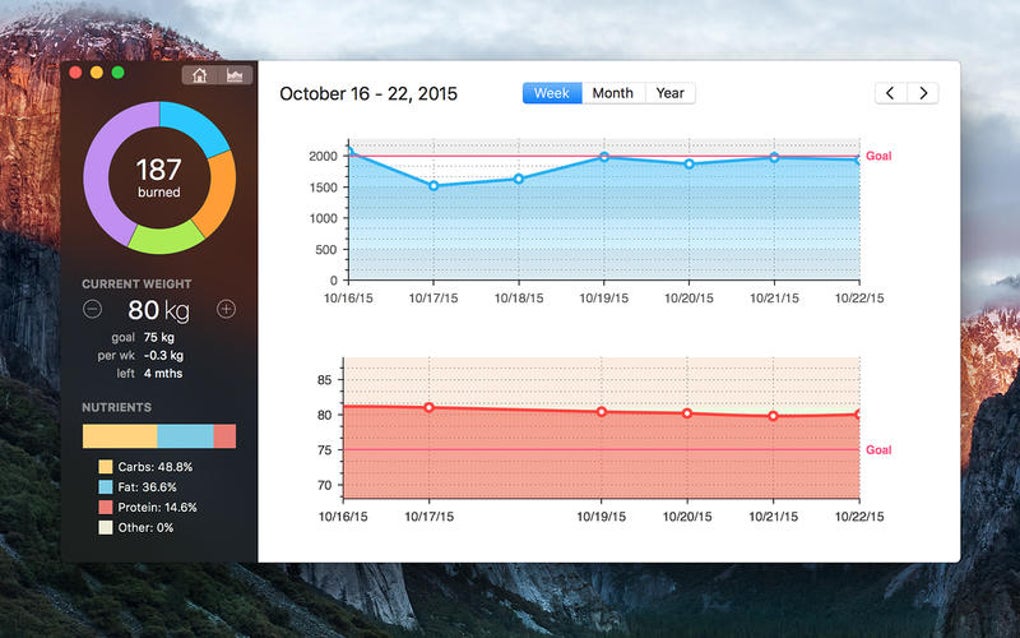
- Daily & Weekly Summaries: Visual charts show calorie consumption trends, helping you stay on track with your goals.
- Goal‑Setting Engine: Set personalized daily calorie limits based on weight, activity level, and desired weight change.
- Multi‑Language Support: Full interface in English and Italian, with easy switching from the preferences menu.
- Offline‑First Design: All data is stored locally on your Mac, ensuring privacy and access without an internet connection.
- Export Options: Export logs to CSV or PDF for sharing with nutritionists or importing into other health apps.
- AppleScript Compatibility: Automate repetitive tasks, such as daily log entries, using macOS scripting.
- Dark Mode Ready: Seamlessly adapts to macOS dark appearance for comfortable night‑time tracking.
Installation, Usage & Compatibility
Step‑by‑Step Installation
Downloading Calories Counter 3 is straightforward. Click the “Download” button on the product page, which will deliver a .dmg installer compatible with macOS 10.9 and later. Open the disk image, drag the application icon into your /Applications folder, and launch it from Launchpad or Spotlight. The first launch triggers a one‑time permission request to access your Documents folder—this is required only if you plan to import or export CSV files. No additional runtime libraries or admin passwords are needed, making the process smooth for both novice and advanced Mac users.
Getting Started with the Interface
Upon opening the app, you are greeted by a dashboard that displays today’s calorie budget, a quick‑add button, and a summary of the previous day’s intake. To log a meal, click “Add Food,” type the name, and select the appropriate entry from the auto‑suggest list. For items not found, you can manually input the nutritional values, and the program will remember your custom entry for future use. The “Meals” tab lets you organize entries into Breakfast, Lunch, Dinner, and Snacks, providing a clear visual breakdown. The “Reports” section generates line graphs and pie charts that illustrate macro distribution (carbs, proteins, fats) over selectable timeframes (daily, weekly, monthly).
Compatibility Details
Calories Counter 3 runs on macOS X (10.9 Mavericks) and all later releases, including macOS Big Sur, Monterey, and Ventura. Its native Cocoa architecture ensures optimal performance even on older hardware such as the 2012 MacBook Pro. Because the software is built exclusively for the Mac ecosystem, there is no Windows, Android, or iOS version available. Users who need cross‑platform synchronization can export their logs and import them into compatible services, but the core experience remains a Mac‑only, offline solution.
Pros & Cons
- Pros
- Completely offline – your data never leaves your computer.
- Native macOS look and feel with dark‑mode support.
- Rich food database and easy custom recipe creation.
- No subscription fees or hidden in‑app purchases.
- Export options for sharing data with health professionals.
- Cons
- Limited to macOS – no Windows or mobile companion apps.
- Database has not been updated since 2017; newer food products may be missing.
- No built‑in sync or cloud backup; manual export required for safekeeping.
- Interface, while clean, may feel dated compared to modern fitness suites.
Frequently Asked Questions
-
Is Calories Counter 3 free to use?
Yes, the full version of Calories Counter 3 is offered as a free download for macOS. There are no hidden fees, subscription charges, or in‑app purchases.
-
Can I sync my data across multiple Macs?
The application stores data locally, so it does not provide automatic cloud sync. However, you can export your log as a CSV file and manually import it on another Mac.
-
Does the software support barcode scanning?
Barcode scanning is not built into Calories Counter 3 because it relies on macOS hardware only. Users can manually enter nutrition data or use the extensive search function.
-
Is there a way to back up my calorie logs?
Yes. From the File menu you can choose “Export → CSV” or “Export → PDF” to create a backup copy that can be stored on an external drive or cloud storage service.
-
Will Calories Counter 3 work on macOS Ventura?
The app is compatible with macOS 10.9 and later, which includes Ventura. Users have reported smooth operation with the latest system updates.
Conclusion & Call to Action
Calories Counter 3 fills a specific niche for Mac users who want a reliable, ad‑free calorie‑tracking tool without the complexity of cloud‑based ecosystems. Its offline‑first philosophy, combined with a solid food database and simple reporting, makes it an excellent choice for anyone who values privacy and prefers a native Mac experience. While the lack of cross‑platform support and an outdated food list may deter power users, the zero‑cost model and straightforward interface remain strong selling points. If you are looking for a hassle‑free way to log meals, set calorie goals, and generate quick reports directly on your Mac, Calories Counter 3 is worth a download. Click the button below to get the latest version and start tracking your nutrition today.







